No audio on Intel DG31PR motherboard
If you have a motherboard like the Intel DG31PR which uses the Realtek ALC888 audio chipset you might come across a problem where the on-board audio will not work despite having the latest driver. The problems seems to be related to a conflict with the Microsoft Universal Audio Architecture (UUA) Bus Driver for High Definition Audio. Fortunately, the solutions is a simple one.
I experienced this problem on a system running Windows XP Professional SP3
In order to solve this problem the UUA driver needs to be disabled and uninstalled and then just re-installed the Intel/Realtek provided driver.
Solution
First you need to open the Device Manager go to Start > Run and type devmgmt.msc With the Device Manager open search for and click to expand System devices > Now search for Microsoft UUA Bus Driver for High Definition Audio. 
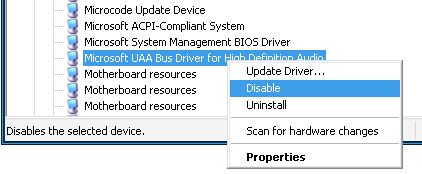
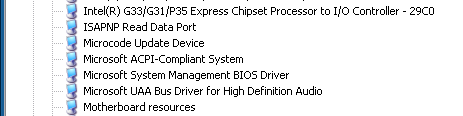 Right click on Microsoft UUA Bus Driver for High Definition Audio, click on Disable to disable the driver.
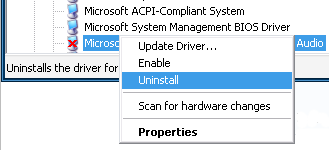
  With the driver disabled right click on the same to Uninstall the driver all together.
  Now reboot the system and install the drivers provided by the board manufacturer. It may be necessary to reboot the system again once the drivers are installed.
intel, uua driver — Nov 2, 2009